To activate the firewall in Mac OS X 10.5 (Leopard), follow these steps:
- From the Apple menu, click System Preferences.
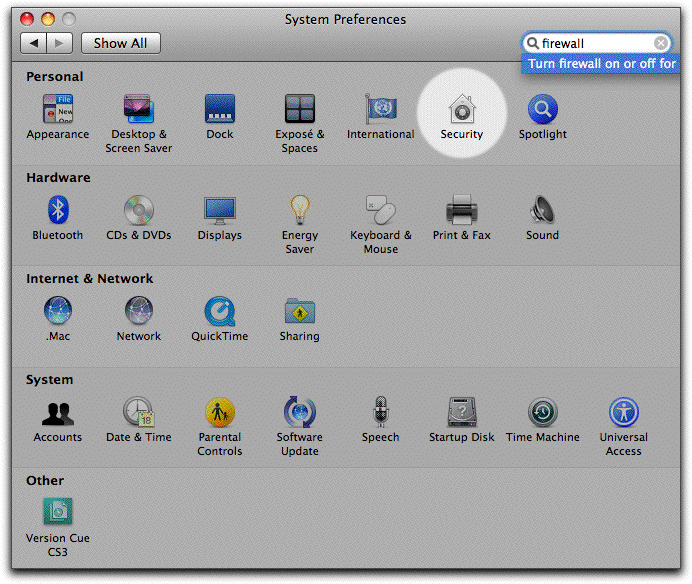
- In the System Preferences window, click the Security icon
in the top row. The icon is circled in white in the following graphic:
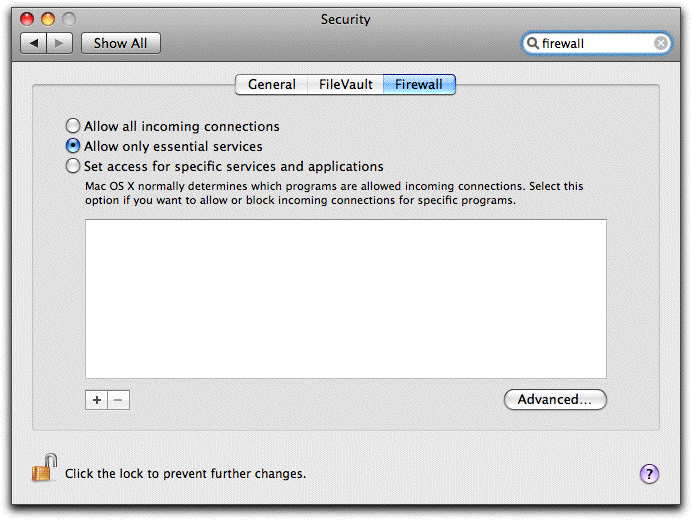
- In the Security window, click the Firewall tab at the top of the screen.
- If not already selected, click in the radio button to the left of Allow only essential services.
- The window should now look similar to the following:
- Click the Advanced button in the lower-right corner of the window.
- If a check mark is not already present, click in the checkbox in front of Enable Firewall Logging.
- If a check mark is not already present, click in the checkbox in front of Enable Stealth Mode.
- The window should now look similar to the one below:

- Click OK.
- Close the Security window.
|